Tag Archives: Workday

Change Job Templates are becoming mandatory. Here’s why that’s an opportunity.

Ask anyone who regularly initiates or approves job changes in Workday what they think of the process, and you will get a consistent answer: it is too long, and it asks for information that has nothing to do with the change being made.

The default Change Job business process includes every sub-process for every reason, and most organisations have never tailored it.

The result is a one-size-fits-all process that fits nobody particularly well. Most live with it. The friction gets absorbed into how people work, the workarounds become a habit, and nobody stops to ask whether it needs to be this way.

The 2026R2 release gives you a reason to stop and ask.

What is changing in 2026R2

Workday is making Change Job Templates mandatory.
 
Templates have existed in Workday for some time and allow you to define a specific set of fields and sub-processes for each change job reason. They tailor the screen to the type of change being made. For a location change, only the relevant fields, such as location and manager, would be displayed. For a promotion, you would expect to see position, manager, and compensation. Everything else is removed from the screen.
 
Some organisations have already configured these. For them, the mandatory change will have no effect. For organisations that have not configured templates, Workday will apply a generic default. That default will include every sub-process for every reason. In other words, nothing changes except that the process is now mandatory rather than just the default. The friction stays. The irrelevant screens stay. The workarounds stay.
About Preos

At Preos, we help our clients get the most out of Workday. We ensure your organisation is using the platform to its full potential and getting the best possible return on your investment.

Learn More

What a well-configured process looks like

When Change Job Templates are set up properly, the experience changes for everyone involved. The person initiating the change sees only the fields that matter for that specific reason. No scrolling through sections that are not relevant. No filling in information that is not going to change.
 
The process reflects what is happening. The approving manager sees a review screen that shows only what changed. Not a full list of every field in the worker record. Just the thing they are being asked to approve. This sounds like a small improvement.
 
In practice, it removes a significant amount of noise from every single job change that goes through the business.

The opportunity 

Beyond the time saving, there is a more significant opportunity.
 
Many organisations’ change job reasons have accumulated over time without much thought. New reasons get added as the business changes, others become redundant but stay in the system, and over time, the list grows unwieldy.
 
Building templates requires you to look at that list properly. Which reasons do you use? Which ones overlap and could be consolidated? Which ones need a genuinely different process, and which are near-identical?
 
This is the kind of foundational work that rarely gets prioritised in the day-to-day, and the mandatory deadline gives you a legitimate reason to do it now. The organisations that manage their change job templates will come out with a cleaner, more coherent process.

How to configure Change Job Templates

Once you have decided what each template should include, the technical work of building it in Workday is relatively quick. A small group of people who understand both your HR processes and your Workday configuration can manage it without needing to involve the wider organisation.
 
The more challenging area is the thinking beforehand. Getting agreement on how change job reasons should be structured, which sub-processes genuinely belong in each template, and what the process should look like for the people using it.
 
There is also a change management piece that is easy to underestimate. When templates go live, the change job screen looks different to everyone who uses it. That might be HR, line managers, or both. People notice when a familiar process changes, even when it changes for the better.
 
Getting ahead of that means thinking carefully about who needs to know, what they need to understand, and how that lands across the organisation before go-live.

The case for acting before the deadline

Waiting until 2026R2 lands and then configuring templates under pressure is possible, but not ideal. You will be doing the thinking about your change job reasons at the same time as managing a release, and the quality may suffer.
 
Configuring templates now means you can test them properly, gather feedback from the people who use the process, and refine before it becomes the mandatory method. It also means you are not inheriting a generic default even temporarily.

Where to go from here

If you want the technical details on how to configure templates in Workday, we have put together a guide covering everything from the Maintain Change Job Templates task through to testing and refining.
 
If you would rather talk through what this looks like for your specific organisation, get in touch with our team.
Contact Preos

How to configure Workday change job templates before the 2026R2 deadline.

A step-by-step guide to configuring Workday Change Job Templates — including how to structure your reasons, which sub-processes to include, and what to think about before you go live.

How to configure Workday change job templates before the 2026R2 deadline.

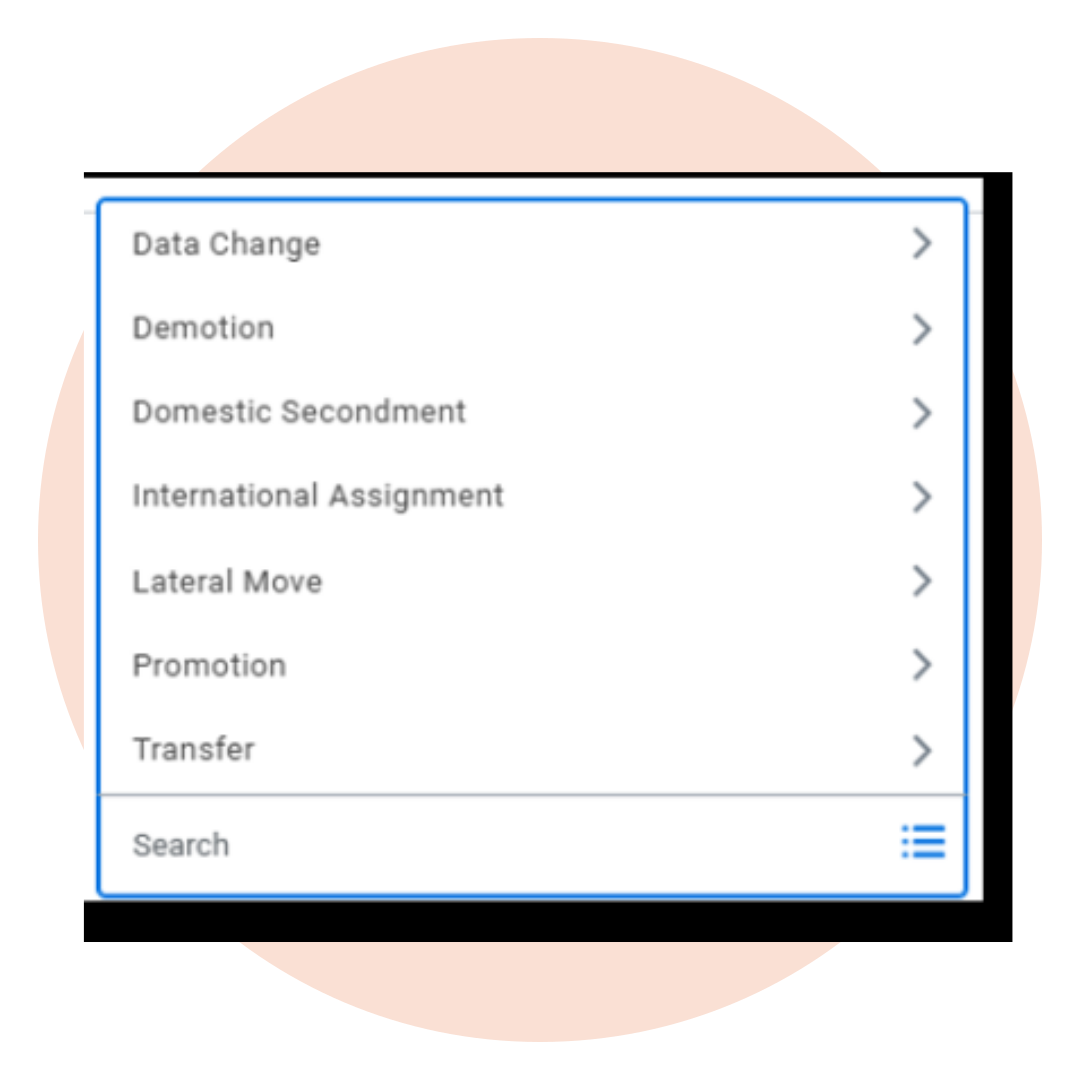
Most Workday tenants run the same Change Job process for every type of job move. Whatever the reason, a new location, a promotion, or a shift in reporting line, the process displays every field, whether it is relevant or not. A manager approving a location move ends up reviewing compensation, organisational assignments, and contract details that are not relevant.  

Change Job Templates let you tailor the process to the reason. From 2026R2, they are mandatory. This guide covers how to set them up.

What change templates do

Each template is tied to a change job reason, such as location change, promotion, line manager change, or role change. The template defines which fields and steps are relevant for that reason, and nothing else appears.
 
A location change might only need the location field and the new manager. A promotion would include position, manager, and compensation. The person initiating the change only sees what is relevant. More usefully, the approving manager only sees what changed, not a full review screen of fields that stayed the same.
 
That last point is where a lot of the time-saving comes from. Before templates, approving a simple location move meant reviewing a screen full of irrelevant information. Templates fix that.
About Preos

At Preos, we help our clients get the most out of Workday. We ensure your organisation is using the platform to its full potential and getting the best possible return on your investment.

Learn More
Change Job Templates

How many templates do you need?

It depends on how many change job reasons your organisation has, and how different the processes are between them. One template can cover multiple reasons if the steps are essentially the same.
 
A good starting point is to pull up your full list of change job reasons and group them by process similarity. Some organisations may only need a couple of templates. Others may need many more. There is no universal right number. 

Steps to set up change job templates

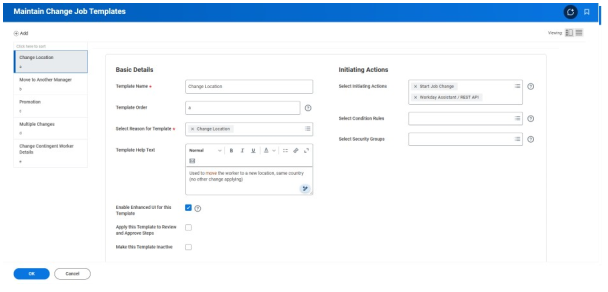
Templates are managed through the Maintain Change Job Templates task. Search for it in Workday, and you will find your existing templates listed there, if any have been configured already.

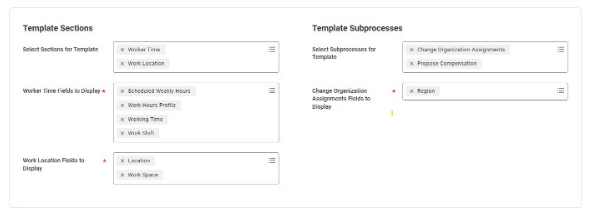
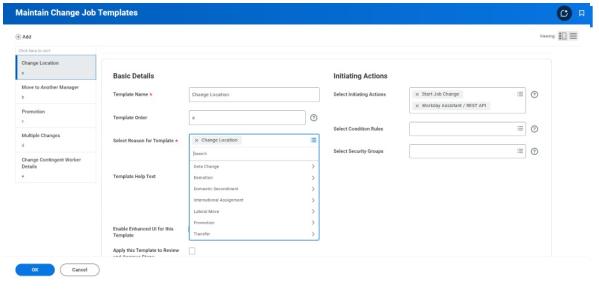
To create a new template, you will name it, select the change job reason or reasons it covers, and choose which sub-processes to include. Sub-processes are the building blocks of the change job — compensation, organisational assignments, position details, manager, and so on. You include what is relevant and leave out the rest.

Once saved, test it. Initiate a change job using that reason and check that the screen shows only what you intended. The approver review screen should look equally clean. If an element is missing or shouldn’t be there, you can update the template. You do not need to rebuild from scratch. 

Areas to consider

Security: Decide who can create and edit templates before you go live. If it is open to everyone, you will quickly have duplicates and inconsistencies. Restricting access to whoever owns your Workday configuration keeps things manageable.
 
Change management: When templates go live, the change job screen will look different to anyone who uses it. That might be HR, line managers, or both. Think about who needs to know about the change, what they need to understand, and how you communicate it before go-live.
 
Custom fields and terminology: If your organisation uses custom change job reasons or bespoke fields, check that these are accounted for in the relevant templates. They can be included; you just need to add them when building.

Before the deadline arrives

If your organisation already has templates configured, the 2026R2 release will not change anything for you. It is still worth a review to make sure everything is accurate and up to date.
 
If you have not configured templates yet, Workday will apply a generic default. That default covers every sub-process for every change job reason, which puts you back to the same long process you had before, except now it is mandatory rather than just the standard.
 
Mapping your change job reasons and thinking through which sub-processes belong in each template is where most effort is required. Getting started now means you can test and refine before the release lands.
 
If you would like support with configuring your Workday Change Job Templates, get in touch with our team.
Contact Preos

Further reading

GLOSSARY

The Workday AI glossary: what the terms you hear mean

Sana, Flex Credits, service agents, uMSA and more: what each term means and why it matters for your organisation.

8 min read     Read resource 

ARTICLE

What is Workday AI?

Workday has used ML for years. The latest capability is a meaningful shift. A plain explanation of Workday AI, how agents work, and what is available right now.

4 min read     Read resource 

ARTICLE

What is Sana, and what does it mean for Workday customers?

What Workday’s acquisition of Sana means in practice: what changed, how the three tiers work, and what to do before your next renewal.

5 min read     Read resource 

Ready, Steady, Stop.

Published: 19 March 2025
Author: Marc Selzer, Business Development Director, Preos

We have all seen or been part of it; you are starting your ERP deployment after having been through a slick sales process, meeting the A team, and speaking to a carefully curated reference customer.

And yet, things are not going smoothly.

What did you miss?

ERP project challenges are nothing new. Since the early days of MRP/ERP deployments, there has been a rich lore of ERP cautionary tales. Certainly, early products were complex and cumbersome, and many project issues could reasonably be blamed on the products.

But since the emergence of true cloud-native platforms, such as those pioneered by Workday, the product quality and the ease of deployment have improved beyond recognition.

So why can deploying a modern enterprise ERP still feel like such a slog? 

In many ways, a modern cloud ERP gives you much more choice in how the product reflects your business; configuration instead of custom code means choices are easier to make and change. Instead of trying to make your business fit the ERP – as was the case with early products – you can configure a modern ERP to suit your business today and change it easily for tomorrow. Perhaps too much choice is the problem. 

But if choice is the issue, quick deployment methodologies such as Workday Launch, where you get an out-of-the-box configuration, would be a much smoother affair. However, our experience is that these deployments are even more challenging. 

At Preos, we specialise in Workday – from implementation to optimisation and beyond. Our business is focused on helping Workday customers get more from their investment, and we think we know the answer; when the implementation partner is ready to get started, the customer simply is not ready.

They haven’t got their team properly resourced (and backfilled), the project objectives haven’t been adequately communicated, and no one has thought through the governance model, to name just three challenges we see.  

This is not to criticise customers in this position – it is easy to see how it happens. Firstly, few businesses have a corporate memory for a project like this; it could be ten years or more since they deployed a new finance or HCM system.

Secondly – and I am not going to win many friends for making this point – vendors tend to skim over the critical readiness steps during the sales process.

It’s cloud, and therefore, it’s easy, seems to be the mantra. Rapid, out-of-the-box deployments compound the issue because the focus is speed to go live, and the pace of the project from the start means there is no time to think about getting prepared. These problems only become apparent later in the project, and I have spoken to several companies who found themselves going live with a product they felt was some way below MVP. 

So, what are the critical components of readiness, and how should a business get to an adequate state of readiness?

Based on our experience, the checklist below is the minimum needed to be ready for an ERP implementation: 
  • Timeline: what do you need in place, and by when 
  • The organisation chart for your team and RACI with roles, responsibilities and assignments defined 
  • Assign a full-time project manager; we see far too many part-time PMs, and our experience is that they cannot sufficiently cover all the moving parts. 
  • Governance structure – must include IT and Finance (especially if Payroll, Expenses or Finance are being deployed) 
  • Empowered decisions: the governance structure must enable the team to make decisions 
  • Assigned roles and responsibilities for integrations and data; this is frequently only addressed once the project is underway, by which time too many design decisions have already been made. 
  • The operating model for HR and/or Finance – you can’t figure this out successfully in the design workshops. 
  • Post-go live/BAU support model; who, skills, role (if any) for 3rd party support. 
  • Understand project phases; be clear with your implementation partner about what you should expect to see in each phase, the purpose, and the confidence level required for exiting a phase.  

This will look like a daunting list for many – especially if the vendor has skirted over it in the sales discussions – but it needn’t be.

The critical activity is to carve out some time with your partner before the project starts (you don’t have to wait for contracts to be signed; your partner should be prepared to invest the time) to work out what is needed.  

At Preos, we take our clients through a structured workshop to ensure they are ready for the deployment project and know what to expect. We set out five key workshop objectives, and if you are going to work through your state of readiness with your implementation partner, I suggest you insist on something similar: 

  1. Define the essential components of client-side readiness and the impact each has on the project. 

  2. Ensure the client can deliver on as many of the components as is practically achievable, prioritising governance, filling of roles and baseline system understanding. 

  3. Agree on a plan to close any gaps – particularly for data and integration client-side roles. 

  4. Work through the conceptual security model, applying this to core process areas, identifying what will need to change from an operational model perspective for the client.

  5. Clarity on what life looks like at the initial go-live and a view of the future roadmap, enabling appropriate change management and eliminating confusion – begin with the end in mind. 

In addition to closing the gap on my list of readiness essentials, a well-thought-out workshop will set expectations for each step of the implementation process. It won’t remove the challenges and speedbumps that are a part of any complex project, but you will feel significantly better equipped to deal with them. 

Modern cloud-based ERP platforms are worlds better than the vertically integrated monoliths of the 90s and early 2000s, but I do feel we have been lulled into a trap of thinking they just require some configuration to work.  

A finance and HCM deployment is still a complex task because it will enable change in the business, and on that basis alone, it should not be underestimated. Making sure you are ready at the start is the foundation for future success. 


Marc Selzer 
Business Development Director, Preos 

Marc is the Business Development Director at Preos and has nearly thirty years of experience in B2B software. His career has included tenures at industry giants such as General Electric and IBM, Salesforce and Workday, assisting organisations across various industries to overcome operational challenges. Marc defines his mission as uniting people, creativity, and technology to drive better business outcomes for clients. 

About Preos

At Preos, we help our clients get more out of Workday. We ensure your organisation is using the platform to its full potential and getting the best possible return on your investment. 

We address any inherited issues, increase user adoption, offer Workday support, and introduce processes to ensure Workday meets – and continues to meet – the needs of your organisation in the long term. Contact the team today to discuss how your organisation can get more from Workday. 

Marc selzer
Business Development Director

Meet the Newest Members of the Workday Enhancement Services Team and why Their Client-Side Experience Matters.

Workday support should offer more than short-term issue resolution, which often overlooks the bigger picture. It should improve and optimise Workday, align it with organisational goals, and build internal capability.

That is the foundation of Workday Enhancement Services (WES) – Workday support designed to deliver business value rather than just break-fix solutions.

Why Workday Support Needs to Evolve

Many organisations are trapped in a cycle of reactive support, relying on external providers for quick fixes that fail to address the bigger picture. Traditional support often overlooks how system changes impact business processes, leaving organisations dependent on external resources.

Workday Enhancement Services (WES) takes a different approach. Instead of just resolving tickets, WES partners with organisations to optimise Workday, align it with long-term goals, and build internal capability.

A key part of this approach is upskilling client teams and empowering them with the knowledge to manage and enhance Workday independently. Rather than creating long-term dependency, WES consultants partner with internal teams, sharing best practices, transferring knowledge, and helping organisations take control of their Workday environment.

The Growing Team of Workday Experts

Highly experienced Workday Consultants Ellen da Costa and Danielle Maycock are joining the growing WES team. With years of client-side experience, they understand organisations’ daily challenges after implementation and know what businesses truly need from Workday support.

Ellen Da Costa
wes lead

Ellen has a decade of Workday experience, specialising in HCM and Benefits. Having worked extensively on the client side, she understands the challenges businesses face after implementation. Ellen has successfully guided organisations through divestitures, acquisitions, and complex Workday tenant merges.

“Having worked on the client side, I deeply understand the challenges businesses face with Workday, especially after going live. WES is more than support – it’s about partnering with clients as an extension of their team, sharing knowledge, and ensuring they feel confident with Workday.”

Ellen is passionate about helping clients maximise their Workday investment and reach operational maturity faster than would be possible with traditional support.

danielle maycock
wes lead

Danielle brings a unique perspective with a decade of Workday experience and eight years of experience in HR and recruiting. This dual expertise allows her to understand Workday’s technical needs while empathising with HR teams’ practical requirements.

“Having been in HR, I know how frustrating it is when Workday doesn’t support HR processes in a way that makes sense. Many Workday support teams focus on fixing system issues, but they don’t always translate technical solutions in a way that makes sense to HR teams or end users. I enjoy bridging that gap and translating business needs into technical solutions that work for everyone.”

Danielle’s ability to speak both the language of HR and Workday ensures that clients receive solutions that work in practice, not just in theory.

How WES Delivers More Than Traditional Support

With Workday Enhancement Services, your senior consultant provides practical system support, resolving your support requests while identifying strategic opportunities to align Workday with your business goals. We build your team’s capabilities through hands-on knowledge transfer, ensuring your system works for you and continuously evolves with your organisation’s needs – transforming your Workday system maintenance from a cost centre into a strategic advantage.

  • Direct access to experienced consultants who understand both technical and business needs.
  • Upskilled internal teams to reduce reliance on external support.
  • Workday roadmaps that align with your business goals
  • Proactive issue prevention using reporting insights.
  • Tailored support, not a one-size-fits-all model.

Learn More About Workday Enhancement Services

With Ellen, Danielle, and a growing WES team, Preos is redefining what Workday support should look like. Interested in learning more about how WES can support your Workday journey? Talk to the WES team today.

Beyond Feature Releases: Turning Workday updates into business outcomes

Published 12 February 2025
Author: Verity Gooch, Head of Workday Enhancement Services, Preos

After years of helping organisations manage Workday’s bi-annual releases, I’ve seen firsthand how these updates can feel like both an opportunity and a burden. Here’s why it’s time to shift our perspective on what these releases truly represent for your business.

Every six months, Workday delivers a new feature release packed with updates designed to make the platform more powerful and aligned with the changing needs of organisations. These updates are full of potential, but for many businesses, they can also feel overwhelming. Release backlogs grow, adoption slows, and the promise of these updates remains just that – a promise. 

As someone who’s worked with countless organisations to maximise the full value of Workday, I can confidently say that feature releases are just the beginning. To truly maximise your investment in Workday, it’s about partnership, planning, and building internal capability. 

Let’s talk about how to turn updates into outcomes. 

The challenge 

When I speak to Workday customers, the same challenges come up time and again: 

“We’re falling behind on updates.”
Life happens, daily operations, competing priorities, and limited resources often mean release backlogs accumulate. 

“We don’t know which features are right for us.”
With every release, Workday offers a wealth of new possibilities. But deciding what’s relevant and impactful isn’t always straightforward. 

“We need more than a short-term fix.”
Many organisations don’t just want help implementing new features; they want to build a long-term strategy and upskill their teams to take ownership of Workday’s evolving capabilities. 

If you want to get more out of your Workday releases, our Workday 2026 R1 guide breaks down the features worth your attention, with practical guidance on effort and impact.

Get The Preos Guide to Workday 2026 R1

These conversations underscore a truth: feature releases aren’t just about ticking boxes. They’re an opportunity to evolve your system, improve processes, and get more value from your subscription. But seizing that opportunity takes more than awareness—it requires a clear plan and the right support. 

So, what advice do I give to those Workday customers? 

When faced with the challenges of release backlogs or uncertainty about which features to prioritise in new releases, I say: 

Start with a clear plan
Begin by evaluating the updates in the context of your organisation’s goals. Which features align with your priorities? Which updates will deliver the greatest value for your team? Prioritising high-impact changes ensures you’re focusing your efforts where they matter most. 

Treat the release like a “mini-project” 
Adopting new features isn’t just an IT project – it’s an organisational effort. Engage stakeholders across different functions early on to identify opportunities and challenges. 

Communicate the WHY 
The Release may impact end-users and therefore require change management. Leveraging Workday Announcements to communicate changes and updates to job aides are common tasks included in the Test Plan. 

Adoption is more successful when employees understand how new features benefit them. Whether simplifying processes, increasing compliance, or saving time, communicating these advantages helps build buy-in and reduces resistance to change. 

Upskill your team 
New features are only as effective as the people using them. Take the time to invest in training and enablement for your internal Workday team. By building their knowledge and confidence, you’re setting the foundation for long-term success. 

Taking a partnership approach

This is where Workday Enhancement Services (WES) come in. Unlike traditional support models, WES isn’t about handing over the reins. It’s about partnership. We work side by side with your Workday team to tackle release backlogs, implement new features, and ensure your system evolves with your organisation’s needs. 

Here’s how that partnership works in practice: 

  1. Every organisation is different, and so are the opportunities Workday updates present. Our role is to help you prioritise updates that align with your goals and map out a manageable plan to adopt them. Whether it’s staying compliant with new regulations, or exploring innovative features, we help you manage what is important for you. 

  2. One of the most rewarding aspects of my role is seeing teams grow in confidence and capability. Our goal isn’t just to clear your backlog or implement updates—it’s to upskill your internal team so they can take ownership of Workday in the long term. Through training, hands-on collaboration, and knowledge-sharing, we help your team feel empowered.

  3. Workday isn’t static, and neither should your system be. Beyond release adoption, we look for opportunities to improve system performance, streamline processes, and prepare for the next release. It’s about creating a system that works harder for you, year after year. 

Final thoughts 

If you’re reading this, you’ve probably already seen Workday’s latest feature release. Maybe you’ve even downloaded our guide to help you understand the updates. But the real question is: how will you use those updates? 

Here’s my advice: Whether tackling a specific release or developing a broader strategy, find a team that will work alongside yours to drive results and build internal capacity. With the right collaboration, you can clear your backlog, adopt impactful features, and set your organisation up for long-term success. 

With WES, we do exactly that. Together, we can turn your updates into outcomes and ensure you get maximum value from Workday. Want to learn more about how WES can support your Workday journey? Let’s talk. 

About Preos

At Preos, we help our clients get the most out of Workday. We ensure your organisation is using the platform to its full potential and getting the best possible return on your investment. 

We address any inherited issues, increase user adoption, offer Workday support and introduce processes to ensure Workday meets – and continues to meet – the needs of your business in the long term.

Get ready for Workday’s move to the Public Cloud: What it means for you and how to prepare

Change is coming for Workday customers as the platform moves to the public cloud.

But what does this mean for you, and how can you prepare for a smooth transition? Let’s break it down.

What is the public cloud?

Public cloud migrations refer to the process of moving an organisation’s IT infrastructure, applications, and data from on-premises or private environments to public cloud platforms like Amazon Web Services (AWS), Microsoft Azure, or Google Cloud Platform (GCP).

The public cloud is a shared service provided by third-party vendors, offering a range of advantages:

  • Scalability
  • Cost-effectiveness
  • Broad access to advanced technologies (e.g., AI, ML, analytics)
  • Enhanced reliability with built-in redundancies
  • Security capabilities tailored to global standards.

When will the migration happen?

If Workday hasn’t contacted you, they will soon be in touch to schedule your migration. The move to the public cloud is mandatory, so opting out is not an option.

However, if you want to migrate to the Public Cloud within the next 6 to 12 months and don’t want to wait until Workday reaches out, you can proactively request your migration by creating a Customer Care --> Business Event --> Data Center Migration case.

Tenant URL Changes

The key impact of this migration is the change in URLs for all tenants.  For example:

From: https://wd3.myworkday.com/<tenantname>/login.htmld

To: https://wd103.myworkday.com/<tenantname>/login.htmld

The critical impacts will be integrations with the tenant and access for both users and the integrations.  Here’s a checklist of things to consider:

Checklist to prepare for Workday’s move to the public cloud:


  • All integrations will need to be reviewed, and impact assessed.  Endpoints and file delivery will require updating and testing to verify that files can be transferred successfully.  This would likely be for both inbound and outbound integrations.
  • All vendors will need to be contacted to support this activity. It will take time to ensure all the changes can be tested thoroughly and ultimately, implemented.
  • Workday Studio access will need to be updated.
  • Recruiters, agencies or 3rd party access including implementers will need to be made aware of the new URLs.
  • User access will also be impactedIf you are utilising Single Sign On (SSO), then it will need to be updated within the tenant and the IDP provider.
  • If an authentication selector is in use, the URLs must be updated to ensure native access.
  • Mobile access – settings within the App will likely need updating to the new URL.
  • Candidates will lose access as the Career site will be migrated.  A notification may be sent to keep candidates updated. Consider updating the header to highlight the upcoming change.  Timing will need to be considered when notifying candidates.
  • Any URLs referencing Workday or the Workday careers site such as on a company intranet site, within training documentation, training guides or any support documentation that has been created will need to be updated.
  • Within the tenant, especially any help text or notifications that reference another part of Workday with a URL.
  • Bookmarks or favourites will no longer work and will need updating.
  • Firewalls and security allowing access to Workday will need to be checked.

When Should You Migrate?

There are several business events to consider that may impact the migration date selection. Consider:

  • Benefits open enrollment period.
  • Year-end processing. 
  • Merit cycle.
  • Seasonal hiring cycle.
  • Planned acquisition or divestiture.
  • Planned add-on deployment. 
  • A company re-org.
  • Blocked or change freeze days.

Additional Considerations:

  • Are key stakeholders within your company aware of the migration and support the effort?

Aligning your migration timeline with your business cycle can help avoid disruptions.

How can Preos help with your move to the public cloud?

At Preos, we support you through every step of your Workday journey. We can support you with the preparation and testing to ensure your organisation makes a smooth migration to the public cloud. Contact us to learn more about how we can help. 

Considering Workday? How medium enterprises can avoid the pitfalls of launch deployments and maximise value at go live.

If you’re weighing up Workday as an ERP for your organisation, you’ve likely been drawn to the promises of a speedy, cost-effective implementation. But the reality is many customers end up underwhelmed at go-live.

So, why is this happening —and how can you avoid it?  

For years, Workday was criticised for its drawn-out implementation timelines. Organisations, particularly medium-sized, were being put off by the prospect of a 6–12-month project with high costs. To address this, Workday introduced Launch– a deployment methodology promising a quicker and cheaper route to getting live.

However, there’s a catch, which is leaving customers leaving disappointed and frustrated.

Workday Launch deployments are significantly quicker, with timelines typically reduced to 3 – 6 months. So, where do the time savings come from?  

Primarily from restricting the Design and Testing phases which means customers cannot customise their to-be configuration design beyond the prescribed methodology – without a change request to the contract, anyway. There is also very little opportunity to get sight of the to-be design before testing.

As a result, the Workday solution you go live with is basic in comparison and far removed from the feature-rich demos you would have likely seen during the sales conversations or at Workday Rising.  

HR functions often set high expectations for a Workday Launch implementation, presenting it as the answer to a wide array of organisational challenges. While ambition is both important and necessary during a digital transformation, it’s crucial to set realistic expectations about what a Launch implementation can deliver.

It’s not a silver bullet; it’s the beginning. 

A Launch deployment lays a solid, scalable foundation that empowers medium enterprises to optimise and improve their system over time. The good news is that optimisation partners like Preos can help. We see Launch for what it is – a starting point. It provides a solid foundation on which to optimise. 

So, if you are an organisation considering Workday via Launch, my advice is to budget not just for the basics, but for follow-on optimisation in your Workday business case. 

Keeping Workday running requires more support than expected.  

Workday is sold as a cloud-based platform requiring minimal support due to automatic updates, outsourced infrastructure, low risk of downtime and a simplified security model which requires simple configuration and no complex development. 

Yet, after going live with Workday it doesn’t take long for clients to realise, they need a solid support model to maintain functionality and—more importantly—to achieve any real return on investment. 

Why Medium Enterprises often end up with ineffective support models.  

The problem often starts with the choice of Workday Partner. Many medium enterprise customers are steered toward large system integrators (SIs) At some point before or during the implementation, the SI will deliver the unfortunate news that in fact, Workday does not look after itself and that a robust support model is required. 

Often, the SI will then sell a multi-year Application Management Services (AMS) contract, explaining to the customer that having the same implementation consultants, with the knowledge of their configuration, is the right approach.  

What they don’t explain is that an SI organisation often has two separate practices – implementation and AMS. This means that the consultants involved in your implementation are rarely part of your AMS or post-go-live support team assigned to your account.   

Instead, you’re left with a transactional, ticket-based AMS model designed for large enterprises—one that’s rarely flexible enough to meet the needs of medium enterprises.  

Large SIs provide transactional AMS through a ticket-based service. This may be well suited for large enterprise organisations with high-volume support needs. But is it a good fit for smaller organisations who want an agile partner who their HRIS team can talk to and learn from, without a ticket, ultimately becoming self-sufficient and less dependent on a third party?

Customers tell me, no. And that’s why medium enterprise customers are moving away from traditional AMS and opting for an alternative approach that is better value for money. For our clients, it’s Workday Enhancement Services

Smarter alternatives to AMS

Workday Enhancement Services (WES) is a smarter alternative to traditional AMS. With WES, you get a dedicated, Workday-certified consultant who knows your organisation inside out—no ticketing, no frustrating delays. Our approach goes beyond basic support, building your internal capabilities so you’re less dependent on outside help. WES is about making Workday work harder for you, maximising the value of your investment and ensuring it drives real, measurable impact across your organisation. 

Workday is a powerful tool, but getting the most from it requires a strategic approach – one that considers the long-term vision of your organisation beyond the initial go-live.

While options like Workday Launch promise speed, they often leave key capabilities untapped, making optimisation a necessary next step. By selecting the right support model, such as Workday Enhancement Services, medium enterprises can avoid the frustrations of conventional AMS and an underwhelming go-live.  

See how IFCO are getting more from Workday with WES

“We’ve seen an evolution in our team, they feel more empowered, more productive, and they feel that there is a real partnership with their WES consultant”

– Stephen Barnett, Head of Global Reward and HRIS, IFCO 

ifco case study

Strategies for Attracting and Retaining Top Talent in Technology and Media with Workday.

Attracting and retaining top talent in technology and media is essential for driving your strategic vision forward.

According to a report by IDC and Workday, nearly half of organisations in these sectors prioritise attracting and retaining top talent as a key driver for strategic success. 

Securing the right talent is not just about filling roles – it’s about building the foundation for the long term.

Engaging a diverse talent pool is key. This is especially true when seeking to include more women in technology. It requires strategic planning and quick, flexible talent management. Profit and growth depend on these factors.

The Needs of the Technology and Media Industries

Tech and media industries exist in a perpetual state of fast-paced evolution, demanding swift action and an agile workforce to fuel mergers, acquisitions, and significant growth efforts. Profit and growth depend on making pivotal decisions. You need to get the right talent in the best positions at the right moment. 

HR Technology doesn’t just support; it becomes the linchpin of talent management success. Here, Workday shines, not merely as a tool but as an enabler of talent acquisition and development. 

Workday’s Role in Talent Identification and Development

Workday is instrumental for technology and media organisations to spot, retain, and secure their top performers. Annual talent reviews support talent decisions. These include promotions, transfers, and career plans. However, many organisations still use Excel and PowerPoint for this critical retention strategy.

About the author

Deniz Gemici, Workday Advanced Compensation, Talent & Performance and Learning Lead at Preos, brings an impressive 12 years of experience in the Workday ecosystem. She’s also a Workday Partner Product Lead, helping to keep Preos ahead of the curve.  Deniz’s passion for her work shines through. With years of experience leading projects, she says “each project has its unique challenges and rewards. I do love what I do.” 

These traditional methods are marked by a lack of data security and reliance on visually unappealing reports for your Executive team to make critical decisions. HR teams spend considerable time making this data visible in PowerPoint juggling between Excel and PowerPoint. Changes discussed and agreed upon during these talent reviews must be fed into the Excel sheet after these sessions. 

Workday offers a great opportunity here.  Talent review in Workday is visual using a calibration process, vital for tech and media organisations. 

    • You can hide employees in certain talent review meetings where needed.
    • You can drag and drop employees in the calibration event and the change will be real-time.
    • You can see relevant employee data on a single screen. This data includes existing succession plans, potential, retention, last year’s and this year’s performance rating, and mobility.
    • In Workday, you can flag top talent. You can then create talent pools to view the information and compare. You can also make plans for this population and send them learning content.

For those at the helm, the need for decision-making armed with insightful HR analytics is non-negotiable. Workday lends itself as the strategic dashboard that delivers just that—vivid, data-driven narratives that enliven top talent management throughout the fiscal year.

Compensation as a Retention Tool

In the compensation review process, Workday gives managers insights into talent attributes, like potential and skill. This helps them make more informed decisions. These decisions retain talent and boost employee satisfaction – a metric that can be regularly measured by an integrated solution like Peakon.

Take the case of dentsu. Faced with challenges in Workday user adoption and fragmented processes, dentsu worked with Preos to unify their annual salary review using Workday. The resulting success story elevated user adoption by 145% and streamlined reward operations significantly. 

Identifying Skills Gaps and Retaining Your top Talent  

Skill shortages continue to challenge retention. Roles are rapidly changing due to tech/infrastructure advancements. So, just upskilling and reskilling is insufficient. 

Workday helps you to upskill, reskill, create succession plans, and provide continuous feedback for more engagement and less attrition. A strategic must in the tech sphere especially.

Analysis of current skills and identifying skills gaps becomes crucial to make sure the right people are placed in the right jobs. If you don’t know what skills you need and what skills your workforce has, you won’t be able to use your top talent. 

Skills-based modelling improves internal career progression. It responds to the needs of employees such as interest in certain skills and opportunities to improve by being placed into specific gigs/projects to achieve those skills or recommended learning. 

This is where Career Hub by Workday can support you to manage existing skills, and skills to be developed by suggesting job openings, mentorship and learning content as well as gigs to support the career progression. 

Tools for Empowering the Individual and Equipping the Manager

It’s an acknowledged reality that employees often leave managers, not companies. Workday’s Manager Insights Hub arms managers with the tools they need for decision-making, integrating performance and talent attributes in one view.

Workday’s Career Path Enabler assists employees in creating a step-by-step path to explore their next moves and reach their career potential.

Recently, Workday has also made it possible to use skills from badged companies, such as Techwolf and SkyHive. This ensures that we can identify the skills based on job and worker data and assess them. 

Tech and media organisations must invest in cloud solutions for core Human Capital Management with a focus on Talent Optimisation, Talent Acquisition and Learning modules in one unified platform, backed by machine learning and AI, to ensure they can identify, develop and retain top talent.

Speed and agility become crucial. This is the competitive advantage of Workday and puts you in an advantageous position among competitors. 

Retaining and attracting top talent lies in adopting strategies that utilise technology not merely as an aid but as an instrument for organisational culture and growth. Through strategic implementation of robust HR technologies like Workday, you can galvanise your current workforce and pave the way for future talent in tech and media.

About Preos

At Preos, we help our clients get the most out of Workday. We ensure your organisation is using the platform to its full potential and getting the best possible return on your investment. 

We address any inherited issues, increase user adoption, offer Workday support and introduce processes to ensure Workday meets – and continues to meet – the needs of your business in the long term.

contact preos

Resources:

  • Workday Podcast: A New Era for Tech and Media | workday-podcast-new-era-for-tech-and-media
  • Workday.com/idctech
  • Career Development: Six Ways to Retain and Engage Top Talent | Workday US
  • Hoe trek en behoud ik als CFO top-talent met AI en Machine Learning?

How to prepare for a Workday Update Release

Workday’s biannual updates in March and September introduce new functionalities and enhancements. Effective release management is essential to capitalise on these additions.

A systematic approach ensures your organisation leverages these updates.  This step-by-step guide will help you prepare and maximise the benefits of each Workday release.

We know that managing Workday updates can be challenging, especially when identifying the most valuable features. That’s why, for each Workday release, our certified consultants create guides. Explore our guides, packed with handpicked insights and analysis on implementation effort versus impact, helping you focus on the features that deliver the most value to your business.


Familiarise Yourself with new Features.

Eight to ten weeks before each release, Workday sets up a Release Centre in the Community. It provides all the information needed to prepare for the update.

Use the Feature Release Guidebook in the Release Centre to plan your release management. It includes essential tools like timelines, schedules, and FAQs. The guide is especially valuable for first-time implementers, providing a solid foundation for effective release management.

Check the ‘What’s New in Workday‘ report in the Release Centre. This report details new, ready-to-use features in production tenants.

Use the Adoption Tool Kit. It will help you to:

  • Evaluate new features.
  • Incorporate them into your release plan.
  • Assign responsibilities.
  • Monitor progress.

Schedule Workday Update Release Important Dates

Check the Maintenance Calendar and plan around it.  You can find the calendar on the homepage of the Release Centre. Note that when Workday updates, it will shut down and will be unavailable for a short period, usually between three to twelve hours.

The updates happen during the weekend maintenance window. The calendar will always state the expected outage time. The Maintenance Calendar will tell you when to expect features in the preview tenant, their production date, and when to implement them.


Test the Workday Update Release

To test the update:

  • Enable and configure new functionalities in the preview tenant.
  • Test all newly activated features.
  • Verify automatic updates.
  • Conduct regression tests to ensure existing functionalities remain intact.

Have a Tenant Management Strategy

Normally, when you make a change to your tenant, you would make the change in the implementation or sandbox tenant. Then test before migrating the change to production. This is good practice to ensure a safe path to production for your changes.

But, with a Workday update release, you should make the change in the preview tenant. Once the release is put into production, you can make any configuration or set-up changes in production.

If you want to refresh your preview tenant at any stage during the six weeks preceding the release, a named support contact can request this. The process is similar to how you would request a sandbox exemption, via the Workday Customer Center. Sandbox and implementation tenants get updated with the new release at the same time as the production tenant.


Schedule Time to Manage the Release

Allocate time to thoroughly review and test new functionalities, assess their impact, and inform affected users of any changes.  Notify users of any noticeable changes to avoid confusion and ensure a smooth transition.

Invest the necessary time in managing each release to maximise the value of your Workday subscription.


Don’t Forget to Tell Your Users About the Changes

Notify users of any noticeable changes to avoid confusion and ensure a smooth transition.

You don’t want to be the person who fails to tell users that the look and feel of Workday is changing and then spends the next week fielding calls from users wondering if they are in the right system, or if they have accidentally changed the settings.


Workday Update Releases Calendar

Feature Release NameStart of Release Preparation WindowFeature Release Delivery
Workday 2024 Release 13 February 20249 March 2024
Workday 2024 Release 210 August 202421 September 2024
Workday 2025 Release 11 February 202515 March 2025
Workday 2025 Release 216 August 202520 September 2025

If you would like to discuss how Preos could help you with Workday Release Management, please get in touch.

The Future of Talent Acquisition: Workday Meets AI

In sectors such as Retail, Manufacturing, and Hospitality, talent acquisition remains a constant challenge. High attrition, ramping up for new openings, or bracing for peak seasons demand a talent pipeline filled with the right candidates and placed in the right role – fast. 

Workday’s acquisition of Hired Score, I believe, is poised to reshape this landscape. The technology works hand in hand with Workday Recruiting to make a streamlined, balanced, and efficient way of increasing headcount, with an eye on identifying the talent who are likely to thrive.

 Workday’s Evergreen Solution  

Workday Recruiting assists with the high volume of vacancies with their Evergreen Requisition process. It allows users to create a ‘bucket’ for candidates to reside in once they have applied. Recruiters can then move candidates to a suitable Job Requisition where they can progress in their quest for employment.

By using Evergreen Requisitions, the clutter on External Career Sites is drastically reduced, it’s more manageable, and simplifies the job search experience for prospective candidates with fewer jobs advertised.

Candidate Grading Powered by AI

The newly acquired HiredScore then comes into play with its AI platform to grade the Candidate based on many factors. The platform evaluates candidates based on a host of variables, such as previous applications in a location, if they are a referrer candidate, legal permissions to work, relevant industry experience, skill compatibility, and overall experience.

All the gathered information on the candidate allows HiredScore to grade the candidate for the specific Job Requisition and allows the recruiter to make an informed decision on whether they feel they are suitable for the role or not. Now, this grade provided is only a guide, but it’s a fantastic way of assisting recruiters with their screening.

Tale of Transformation

Recently, A Workday Customer in the manufacturing industry implemented Workday Recruiting and HiredScore. They noticed that the use of AI made it twice as likely for a candidate to get to the offer stage.

Recruiters only needed to review around 30% of the candidates who applied, and 80% of filled requisitions were done so with talent that was already in their candidate database. This meant that the recruiters could concentrate their time on high-potential candidates who were more likely to be successful in their application and significantly enhance their recruitment cycle efficiency.

Harmonisation Between Workday and HiredScore

For the day-to-day use of both Workday Recruiting and HiredScore, there is a clear harmonisation that exists between the two. You can take actions in HiredScore against candidates which are reflected in Workday in real-time. This includes moving candidates to the next stage in the Job Application process whilst still obeying the condition rules that might exist in Workday.

If you are looking to perform high-volume recruitment, then I would suggest it’s advisable to carry out the bulk of the initial candidate screening in HiredScore. Once you have meaningful contact with a candidate, Workday Recruiting should then become the dominant platform.

A new era for HR and Recruiters

I believe that this collaboration between Workday and HiredScore is the solution that companies with high-volume recruiting have been searching for. 

It introduces an innovative approach that not only comprehends the unique pressures of Retail, Manufacturing, and Hospitality but also offers a solution that brings the entire recruitment lifecycle into sharp relief for HR professionals and recruiters.

It’s an exciting time for recruiters and shows there is a light at the end of the never-ending stream of vacancies to fill.

About Adam

Adam is a Workday Certified Functional Lead Consultant (Recruiting, Talent & Performance, HCM and Launch) specialising in Recruiting. Adam has been Workday certified since 2017 leading many multinational projects over a large range of different industries. Since 2013, Adam has been implementing Recruiting solutions for IBM Kenexa, Alight and now Preos.

About Preos

At Preos, we help our clients get the most out of Workday. We ensure your organisation is using the platform to its full potential and getting the best possible return on your investment. 

We address any inherited issues, increase user adoption, offer Workday support and introduce processes to ensure Workday meets – and continues to meet – the needs of your business in the long term.

learn more

For more insights or to explore how Workday can enhance your talent acquisition strategy, contact us today. 

contact preos