Category Archives: Guide

Change Job Templates are becoming mandatory. Here’s why that’s an opportunity.

Ask anyone who regularly initiates or approves job changes in Workday what they think of the process, and you will get a consistent answer: it is too long, and it asks for information that has nothing to do with the change being made.

The default Change Job business process includes every sub-process for every reason, and most organisations have never tailored it.

The result is a one-size-fits-all process that fits nobody particularly well. Most live with it. The friction gets absorbed into how people work, the workarounds become a habit, and nobody stops to ask whether it needs to be this way.

The 2026R2 release gives you a reason to stop and ask.

What is changing in 2026R2

Workday is making Change Job Templates mandatory.
 
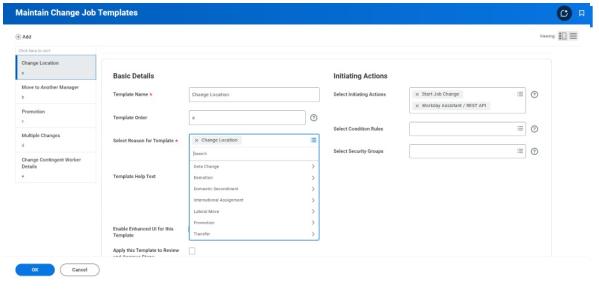
Templates have existed in Workday for some time and allow you to define a specific set of fields and sub-processes for each change job reason. They tailor the screen to the type of change being made. For a location change, only the relevant fields, such as location and manager, would be displayed. For a promotion, you would expect to see position, manager, and compensation. Everything else is removed from the screen.
 
Some organisations have already configured these. For them, the mandatory change will have no effect. For organisations that have not configured templates, Workday will apply a generic default. That default will include every sub-process for every reason. In other words, nothing changes except that the process is now mandatory rather than just the default. The friction stays. The irrelevant screens stay. The workarounds stay.
About Preos

At Preos, we help our clients get the most out of Workday. We ensure your organisation is using the platform to its full potential and getting the best possible return on your investment.

Learn More

What a well-configured process looks like

When Change Job Templates are set up properly, the experience changes for everyone involved. The person initiating the change sees only the fields that matter for that specific reason. No scrolling through sections that are not relevant. No filling in information that is not going to change.
 
The process reflects what is happening. The approving manager sees a review screen that shows only what changed. Not a full list of every field in the worker record. Just the thing they are being asked to approve. This sounds like a small improvement.
 
In practice, it removes a significant amount of noise from every single job change that goes through the business.

The opportunity 

Beyond the time saving, there is a more significant opportunity.
 
Many organisations’ change job reasons have accumulated over time without much thought. New reasons get added as the business changes, others become redundant but stay in the system, and over time, the list grows unwieldy.
 
Building templates requires you to look at that list properly. Which reasons do you use? Which ones overlap and could be consolidated? Which ones need a genuinely different process, and which are near-identical?
 
This is the kind of foundational work that rarely gets prioritised in the day-to-day, and the mandatory deadline gives you a legitimate reason to do it now. The organisations that manage their change job templates will come out with a cleaner, more coherent process.

How to configure Change Job Templates

Once you have decided what each template should include, the technical work of building it in Workday is relatively quick. A small group of people who understand both your HR processes and your Workday configuration can manage it without needing to involve the wider organisation.
 
The more challenging area is the thinking beforehand. Getting agreement on how change job reasons should be structured, which sub-processes genuinely belong in each template, and what the process should look like for the people using it.
 
There is also a change management piece that is easy to underestimate. When templates go live, the change job screen looks different to everyone who uses it. That might be HR, line managers, or both. People notice when a familiar process changes, even when it changes for the better.
 
Getting ahead of that means thinking carefully about who needs to know, what they need to understand, and how that lands across the organisation before go-live.

The case for acting before the deadline

Waiting until 2026R2 lands and then configuring templates under pressure is possible, but not ideal. You will be doing the thinking about your change job reasons at the same time as managing a release, and the quality may suffer.
 
Configuring templates now means you can test them properly, gather feedback from the people who use the process, and refine before it becomes the mandatory method. It also means you are not inheriting a generic default even temporarily.

Where to go from here

If you want the technical details on how to configure templates in Workday, we have put together a guide covering everything from the Maintain Change Job Templates task through to testing and refining.
 
If you would rather talk through what this looks like for your specific organisation, get in touch with our team.
Contact Preos

How to configure Workday change job templates before the 2026R2 deadline.

A step-by-step guide to configuring Workday Change Job Templates — including how to structure your reasons, which sub-processes to include, and what to think about before you go live.

How to configure Workday change job templates before the 2026R2 deadline.

Most Workday tenants run the same Change Job process for every type of job move. Whatever the reason, a new location, a promotion, or a shift in reporting line, the process displays every field, whether it is relevant or not. A manager approving a location move ends up reviewing compensation, organisational assignments, and contract details that are not relevant.  

Change Job Templates let you tailor the process to the reason. From 2026R2, they are mandatory. This guide covers how to set them up.

What change templates do

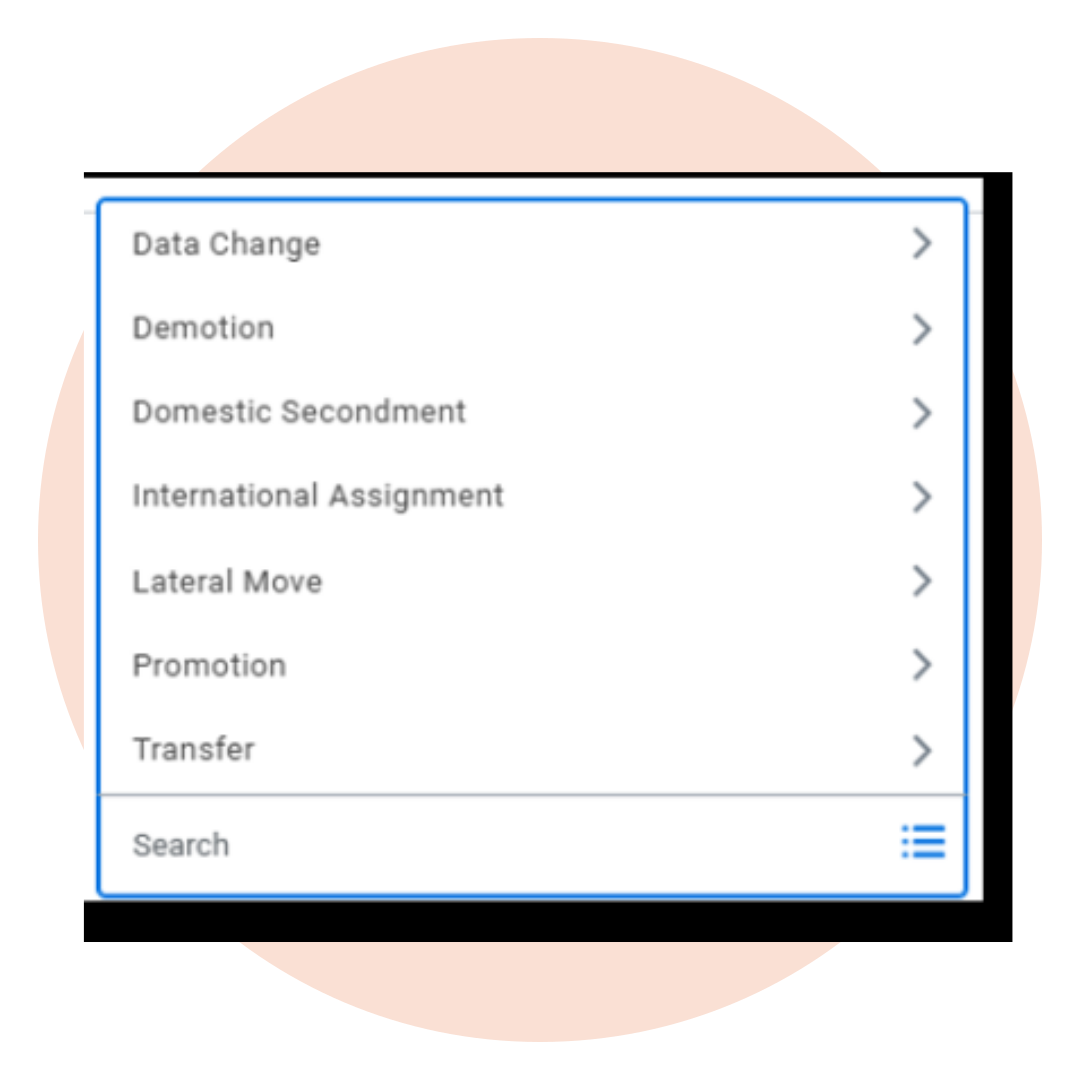
Each template is tied to a change job reason, such as location change, promotion, line manager change, or role change. The template defines which fields and steps are relevant for that reason, and nothing else appears.
 
A location change might only need the location field and the new manager. A promotion would include position, manager, and compensation. The person initiating the change only sees what is relevant. More usefully, the approving manager only sees what changed, not a full review screen of fields that stayed the same.
 
That last point is where a lot of the time-saving comes from. Before templates, approving a simple location move meant reviewing a screen full of irrelevant information. Templates fix that.
About Preos

At Preos, we help our clients get the most out of Workday. We ensure your organisation is using the platform to its full potential and getting the best possible return on your investment.

Learn More
Change Job Templates

How many templates do you need?

It depends on how many change job reasons your organisation has, and how different the processes are between them. One template can cover multiple reasons if the steps are essentially the same.
 
A good starting point is to pull up your full list of change job reasons and group them by process similarity. Some organisations may only need a couple of templates. Others may need many more. There is no universal right number. 

Steps to set up change job templates

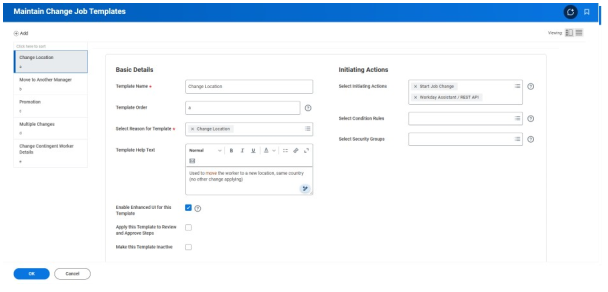
Templates are managed through the Maintain Change Job Templates task. Search for it in Workday, and you will find your existing templates listed there, if any have been configured already.

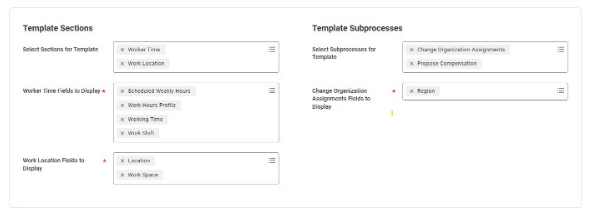
To create a new template, you will name it, select the change job reason or reasons it covers, and choose which sub-processes to include. Sub-processes are the building blocks of the change job — compensation, organisational assignments, position details, manager, and so on. You include what is relevant and leave out the rest.

Once saved, test it. Initiate a change job using that reason and check that the screen shows only what you intended. The approver review screen should look equally clean. If an element is missing or shouldn’t be there, you can update the template. You do not need to rebuild from scratch. 

Areas to consider

Security: Decide who can create and edit templates before you go live. If it is open to everyone, you will quickly have duplicates and inconsistencies. Restricting access to whoever owns your Workday configuration keeps things manageable.
 
Change management: When templates go live, the change job screen will look different to anyone who uses it. That might be HR, line managers, or both. Think about who needs to know about the change, what they need to understand, and how you communicate it before go-live.
 
Custom fields and terminology: If your organisation uses custom change job reasons or bespoke fields, check that these are accounted for in the relevant templates. They can be included; you just need to add them when building.

Before the deadline arrives

If your organisation already has templates configured, the 2026R2 release will not change anything for you. It is still worth a review to make sure everything is accurate and up to date.
 
If you have not configured templates yet, Workday will apply a generic default. That default covers every sub-process for every change job reason, which puts you back to the same long process you had before, except now it is mandatory rather than just the standard.
 
Mapping your change job reasons and thinking through which sub-processes belong in each template is where most effort is required. Getting started now means you can test and refine before the release lands.
 
If you would like support with configuring your Workday Change Job Templates, get in touch with our team.
Contact Preos

Further reading

GLOSSARY

The Workday AI glossary: what the terms you hear mean

Sana, Flex Credits, service agents, uMSA and more: what each term means and why it matters for your organisation.

8 min read     Read resource 

ARTICLE

What is Workday AI?

Workday has used ML for years. The latest capability is a meaningful shift. A plain explanation of Workday AI, how agents work, and what is available right now.

4 min read     Read resource 

ARTICLE

What is Sana, and what does it mean for Workday customers?

What Workday’s acquisition of Sana means in practice: what changed, how the three tiers work, and what to do before your next renewal.

5 min read     Read resource 

How to get maximum value from Workday 2024 R1

Managing Workday 2024 R1

Managing Workday updates can be challenging, but each release brings more value and opportunity to your organisation. 

The Workday 2024 Release 1 is on its way, and our Workday experts have prepared a guide to help you cut through the noise and learn what features will bring you maximum benefit. 

The Workday 2024 Release 1 guide offers a selection of expert-picked updates, detailing each feature’s benefits, required effort, and impact. It includes best practices for adoption and transition management tips from our Head of Change Management, designed to streamline your update process.

Get the Preos Workday 2024 Release 1 Guide today.

download the guide

Getting the most from each release 

To take advantage of the releases it is essential to have a methodical approach to Workday Release Management. This includes ensuring the relevant people in your organisation are aware of the expected changes.

    • Engage Early: Start exploring the Release Centre eight to ten weeks in advance. It’s filled with resources like the Feature Release Guidebook and the What’s New in Workday Report.
    • Test Thoroughly: Use the preview tenant for hands-on testing. It’s crucial to not only try out new features but also ensure they integrate smoothly with your existing setup.
    • Communicate Clearly: Keep your team informed about upcoming changes. A well-informed team can better adjust to new functionalities.
    • Plan Around the Calendar: Keep an eye on the Maintenance Calendar for critical dates, including system downtime, to minimise operational disruptions.

Learn more about how to prepare for a Workday Update Release.

Support when you need it

If you’re looking for more personalised assistance with the Workday 2024 Release 1, our team at Preos is here to help.

Get in touch today. 

Optimising Your Experience at Workday Rising 2023

Workday Rising EMEA is one of the most anticipated events in the Workday calendar. With so much to see and do, it can be hard to know where to begin, especially if it is your first time attending Workday Rising.

In this blog post, we cover everything you need to know about Workday Rising to get the most from your experience. 

1. Book your sessions in advance

Because there are so many great sessions and events offered at Workday Rising, it’s easy to get overwhelmed and miss out on things you’re interested in. The sessions offered at Workday Rising cover a range of topics, and by booking in advance, you can ensure you get to attend the ones that are most relevant to you. Keep in mind that popular sessions fill up fast, so it’s important to act quickly.

2. Balance your time

With so many speakers to hear from it may be tempting to fill your whole day with sessions, but we recommend caution. Take the time to check out the exhibitor hall, network and talk with your peers in the room. 

3. Connect with Workday Partners and exhibitors 

With so much Workday expertise under one roof, you’ll be able to have your burning Workday questions answered. The Preos team will be in the expo hall to talk all things Workday optimisation and on hand to offer any support. You can book a 1-2-1 with our team ahead of time to ensure you have dedicated time to discuss your challenges.

Book a complimentary one-to-one consultation at Workday Rising. 

To help you address any Workday challenges we are offering one-to-one consultations with our Workday experts to solve your specific needs. Contact us to book a time.

CONTACT US

4. Use your lunch break to network

During Workday Rising, there will be many networking opportunities. But one of the most conducive times to network is during lunchtime. Resist the temptation to rush off to find food alone or to catch up on emails. Instead, grab your lunch and sit beside a stranger, or better still, someone who attended the same session as you. Strike up a conversation and see what you can learn from them. 

 5. Attend brain dates

Brain dates are sessions dedicated to connecting people with similar interests. Sign up to attend these sessions and leverage that time to meet new people, learn, and even find a resolution to a challenge you might be having. 

6. Engage in social activities

Workday Rising isn’t just about attending sessions, networking is one of the main benefits. Be sure to take advantage of social activities to connect with other attendees throughout the event. 

7. Create your personalised LinkedIn QR code

Make connecting with your newfound contacts a breeze by having your own unique LinkedIn QR code ready to use. Whether you choose to print it on a business card or save it as your phone home screen, this handy tool allows your new connections to scan and instantly find you.

8. Have fun!

Last but not least, don’t forget to enjoy yourself while attending Workday Rising. There will likely be plenty of opportunities for socialising outside of formal events – take advantage of them! Take some time to explore Barcelona. Try new restaurants, visit historical sites, and enjoy all that the city has to offer. 

Curious to learn more about Preos as a Gold Sponsor at Workday Rising 2023? Discover how our team is leading the charge in Workday Optimisation and how you can connect with us at the event.  

learn more

Maximising Value with Workday 2023 R2 Essential Guide

Workday is a powerful tool, yet we know that making the most of its regular updates can be challenging. We’re here to help simplify the process and ensure you extract maximum value from each release.

Every new Workday release brings fresh functionalities and enhancements to your organisation, and the upcoming Workday 2023 R2 release is no different. 

As a trusted Workday partner, we’ve prepared a user-friendly guide to the Workday 2023 R2 Release. Our team of certified Workday experts, with their wealth of experience, have created this guide to highlight standout features of the latest release to help you plan and make the most of new functions offered to your organisation. 

With clear sections, it breaks down the complex details of the release, helping you to maximise the potential of these new features in your organisation’s operations.

If you have any questions about the Workday 2023 R2 Release or Release Management, our team of experienced Workday consultants is here to help.

get in touch
download the WORKDAY 2023 R2 GUIDE

Boosting Workday User Adoption: 7 Effective Strategies That Deliver Results

Bringing Workday into your organisation can lead to some transformational benefits. But realising them is entirely dependent on the successful adoption of the platform. And that’s not always a walk in the park.

Any major shift within a company – whether it’s introducing new software or reimagining team structures – requires change management. Simply put, change management refers to the tactics and methods implemented to ensure change is executed seamlessly and with minimal business disruption.

It’s a battle fought on several fronts. There are psychological considerations as well as practical ones – from getting people on board with the very idea of something different to delivering the training required to get the most from new software.

In this article, we use our experience guiding companies through successful change management initiatives to share some top tips for getting the most from your Workday investment.

contact preos

Tip 1: Reduce complexity

Any fans of needlessly complicated things in the room?

Didn’t think so.

Complexity can be a huge barrier to the adoption of any new solution, and Workday is no exception. It’s not uncommon to see organisations with numerous customisations in their Workday deployment that make using the platform a daunting prospect for employees and managers alike.

If this sounds familiar, take a step back. It’s important to remember that people will only have so much patience when trying to use a new tool. In fact, the natural reaction when things get complicated is to head for the hills and revert to tried and tested methods. Which probably means welcoming back your old friend, Excel.

With that in mind, the first step to successful change management isn’t really about change management at all – it’s about optimising the configuration of your system and processes and keeping things simple.

In our experience, there are lots of reasons a Workday implementation can be overcomplicated, like regulatory measures or just a basic misunderstanding of how the product works. Or attempts to transpose the way things were done previously directly into the system.

The good news is that in nine out of ten cases, it’s easy for a trained eye to see where things can be simplified to make the management and use of your platform far easier – and people far more likely to embrace it.

Tip 2: Establish exactly where and how Workday could be deployed

When deploying Workday, you need to give some serious thought to who in your organisation you want to use it, and what for.

The amount of change it can introduce in people’s lives can vary dramatically, and not all change will be viewed as positive. Finding the right use cases is a must. If you ask people to use the platform for things that add complexity rather than reduce it, you’ll likely encounter some major problems with adoption.

So, step two is to thoroughly assess the roles in your organisation that could benefit from Workday – and then, more specifically, the individual tasks people in those roles can use the platform for.

The best place to start with this is to consider the reason you chose Workday in the first place. This approach will also ensure that you integrate the right data within the platform, which is one of the biggest reasons adoption fails.

Once you’ve identified these core processes, it’s important that you continue to search for other use cases and benefits for different user groups. After all, the greater the adoption the greater your ROI. Each use case will be different, but the most important element is to understand where initial resistance comes from, and remove those obstacles as quickly as possible.

Of course, there are some instances where people will have to use Workday whether they like it or not, because it’s what’s best for the organisation.

For example, a common complaint from senior managers is having to create job requisitions or initiate job change transactions. As this is something that’s only done once a year or so, it can take a long time to complete – all while taking the manager away from more value-adding activities.

In situations like this, your focus should be on making it as easy as possible to complete the task in Workday. It must be simpler than calling or emailing HR. Getting this right requires the right support structure with local points of contact and champions to help managers use the system.

Book a complimentary Workday User Adoption Strategy Session.

Book your complimentary 30-Minute Personalised Strategy Session with our Workday user adoption expert today and make immediate progress towards increasing Workday user adoption at your organisation. 

CONTACT US


Tip 3: Demonstrate the benefits to encourage adoption

As a general rule, people are resistant to change. And asking people to change the way they work is notoriously difficult.

This will be especially true of certain demographics in your workforce – namely those that have been in their position a long time and are used to a particular way of doing things. After all, we all get attached to the things we’re familiar with. Even if those things are spreadsheets.

An even bigger problem arises when people feel the tools you’re giving them are adding to their workload. So, it’s vital to make the benefits of Workday clear – both personal and organisational – to every single person who will use it.

One way of doing this is to reframe the idea of having more things to do. Workday should be seen as enabler rather than a burden – something that provides direct access to the tools people need to get things done without having to ask anyone for help.

Essentially, Workday should never feel like it’s adding more work to already full plates. It should only ever help people to work smarter and more efficiently. But this has to be communicated effectively. Language around the solution should be positive, it should focus on the benefits of the platform and, if possible, those benefits should be shown not told.

For example, in the past we’ve encouraged companies to share short videos of senior team members using Workday to accomplish simple tasks on their mobile devices. This is a quick and easy way of showing a wide audience the efficiency it can bring to otherwise complicated processes.

Tip 4: Identify your early adopters and Workday advocates

Another important element of driving adoption is finding the people who can help accelerate uptake – those most likely to embrace change.

Digital natives, for instance, are generally more eager to adopt new technologies than Gen X. So start with those easy wins, and have them share their success stories far and wide to encourage others.

One technique we’ve seen implemented successfully is to identify key influencers within the organisation; the people your workforce listens to and takes its lead from. These may not automatically be the people in charge – although it’s important to note that all change should be led from the top, and your leaders should be aware whose voices carry the furthest in your organisation. Regardless, it’s important to cast a wide net with your stakeholder mapping to identify where advocacy and influence really come from.

Once you’ve identified these agents of change, and made Workday a central part of their role, they can become evangelists for the platform.

In the past, we’ve helped these individuals make Workday a part of their career path. And we’ve developed internal Centres of Excellence, where those with an appetite for the platform can continue to develop and refine its use for the good of the organisation.

The main point here is that if you choose people of influence who are already eager to adopt the solution, and provide them with the support needed to thrive, they will inevitably bring others along for the ride with them.

Not only will your advocates be more convincing to their peers than messages passed down from management, but they can also help with some essential local and cultural knowledge, understanding the best way to share ideas with the wider workforce to encourage adoption.

For example, in Japan we used Manga cartoons to engage employees to complete their day-one tasks following the launch of a new feature. Every company culture is different, and those with boots on the ground will have a better sense of it than anyone.

Tip 5: Remove pain points with timely, flexible training

Providing the right training is perhaps the most important aspect of removing barriers to adoption.

Often, we see training that only covers the “happy path” – how things should work when all goes according plan. But what happens when things go wrong? Because if there’s ever a certainty in life, it’s that something, at some point, will go wrong.

If people have to resort to calling support or finding answers from others in the organisation when this happens, you’ll quickly find the limits of their patience. Which is why robust and flexible guidance is imperative.

Training must be tailored to specific roles and activities, and delivered in easy-to-digest modules that use human language and not technical terms to communicate ideas. And, vitally, it must be accessible on demand, so people can resolve problems and learn new skills quickly.

It’s also important to remember that people learn in vastly different ways, so be sure to use a combination of e-learning, quick reference guides, videos, and simulations to make it as easy as possible for people to absorb information in the way they feel most comfortable.

Tip 6: Focus on continuous improvement

When it comes to Workday, change management isn’t a once-and-done activity. In part because the platform itself is improved and updated so regularly.

Keeping up with the changes can feel like the infamous task of painting the Forth Bridge: Once you’re done, it’s time to start over. But the rewards are worth the effort. So, it’s important that training and optimisation are continuous activities to prevent people from falling behind and getting lost in new features.

It’s also imperative that you conduct regular housekeeping activities. If data isn’t integrated with Workday, or if it’s done so incorrectly, the results the platform delivers will be inaccurate. And if the results are inaccurate, then you won’t achieve the business outcomes you were looking for.  

To avoid this, you need regular checks and balances in place to make sure Workday is being used correctly and people are getting the results they expect – and, of course, that your organisation is getting the most value from its investment.

In addition, you must have a living and breathing governance structure, with clear ownership of processes, the system, data, and knowledge management. This is key to creating a culture of continuous improvement.

Think about rewarding ideas and proactivity in this area. A little acknowledgement can go a long way in building adoption, advocacy, and ownership.

Tip 7: Measure success

Of course, there’s no point in continually moving forward if you’re not clear on the impact your actions are having. The final step of your change management program is to regularly measure the success you’ve achieved and identify areas for improvement.

Success will look different for everyone, so it’s best to start by reminding yourself why you adopted Workday to begin with. What efficiencies were you trying to achieve? Are your KPIs being met? And most of all, are your people happy?

The importance of this last point can’t be overstated. Really listen to the people in your organisation who use Workday (they almost always have plenty to say). Find out what their pain points are and make a visible effort to address them. You may even want to create a group for your power users to share optimisation ideas.

If your people feel like you’re working alongside them to make their lives easier, they’re far more likely to get on board.

Want to learn more?

As a Workday partner, we provide optimisation services to organisations of all sizes, delivering the guidance, training, and support to help you get the most from your investment.

A big part of our service offering is change management. In fact, we recently helped one company achieve a 97% Workday adoption rate within a week of go-live.

If you’d like to learn more about how we can help your organisation navigate change, get in touch.

contact preos